
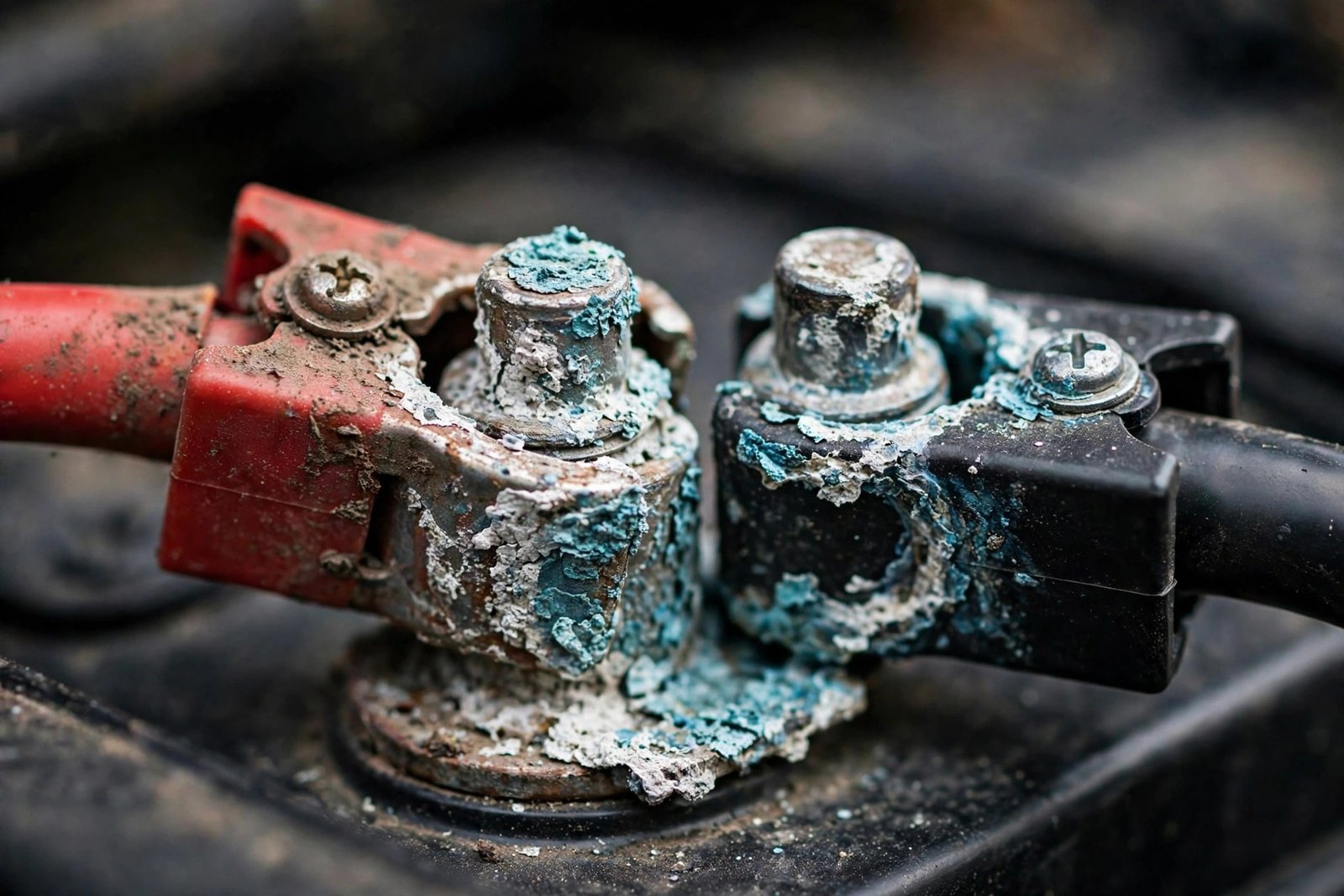
That white, blue, or green crusty buildup on your battery terminals isn’t just ugly — it’s resistance. Even a thin layer can choke off the hundreds of amps your starter needs, causing slow cranking, clicking, flickering lights, or a complete no-start. The good news: most corrosion is a 20-minute DIY fix. The key question is whether cleaning is enough — or the terminals are done. This guide makes that call first, then gives the exact safe sequence.
In this guide, you’ll learn:
- What terminal corrosion is and why it happens
- The clean-vs-replace decision (with inspection criteria)
- The exact safe cleaning sequence, step by step
- How to prevent it from coming back
- When the battery itself — not the terminals — is the problem
- Typical cost ranges (verified 2026-10-14)
Safety first: Wear gloves and eye protection — corrosion contains battery acid. Work with the engine OFF. No smoking near the battery (hydrogen gas). Always disconnect the negative cable first and reconnect it last.
What You’re Looking At
Battery corrosion is usually a white, bluish-green, or greenish powdery crust on the terminals and cable clamps. It’s caused by battery acid fumes reacting with the metal terminals — accelerated by heat, overcharging, and age. A little is normal over time; heavy or fast-returning buildup signals a problem.
What it does: corrosion is an insulator. It adds resistance exactly where maximum current must flow, so the starter starves — even with a healthy battery. Symptoms: slow cranking, clicking, flickering dash lights, or intermittent no-starts that come and go.
Clean or Replace? Decide First
Cleaning is enough when:
- The buildup is surface crust on otherwise solid metal
- The clamps tighten snugly onto the posts and don’t move by hand
- The cables are flexible with no green corrosion wicking into the copper strands
- This is the first time you’ve seen significant buildup in a year or more
Replace the terminals when:
- A clamp is cracked, or it won’t tighten no matter what — cleaning can’t fix mechanical failure
- The metal is visibly eaten thin or pitted through
- Green corrosion has wicked up into the copper cable under the insulation (the cable is compromised too)
- Heavy corrosion returns within weeks of cleaning — the battery is likely leaking acid at the posts
Replace the battery (not just the terminals) when:
- The case is swollen, cracked, or leaking fluid
- Corrosion keeps returning rapidly no matter what you do
- The battery is 4+ years old and failing load tests
The Exact Safe Cleaning Sequence
- Gear up: gloves and safety glasses on. Engine OFF, key out.
- Inspect first: look for swelling, cracks, or leaking fluid on the battery case. If you see any — stop; the battery needs replacing, not cleaning.
- Disconnect negative first: loosen the negative (−, black) clamp nut and slide the cable off. Tuck it aside so it can’t touch metal.
- Then disconnect positive: same process for the positive (+, red) cable.
- Mix the neutralizer: about a tablespoon of baking soda in a cup of water, stirred until dissolved. (Don’t use soda/cola — the sugars leave sticky residue that attracts dirt.)
- Apply and scrub: brush the solution onto the terminals, posts, and clamps with an old toothbrush or wire brush. Bubbling means it’s neutralizing acid. Scrub until you see clean, shiny metal.
- Rinse lightly: wipe with a damp cloth or a careful rinse — don’t flood the engine bay.
- Dry completely: moisture left behind starts the next round of corrosion.
- Inspect the decision points: clamps solid? Cables healthy? If yes, continue. If no — replace now (see above).
- Reconnect positive first, then negative. Tighten snugly — firm, not gorilla-tight. Neither clamp should move by hand.
- Protect: apply a thin layer of dielectric grease or petroleum jelly to the terminals, or slip on anti-corrosion felt washers. This seals out moisture and acid fumes.
- Start the car and confirm normal cranking.
Prevent It From Coming Back
- Check terminals every 3–6 months — catching it early keeps it a 5-minute wipe instead of a 20-minute scrub.
- Felt washers + dielectric grease after every cleaning — the standard prevention combo.
- Don’t overcharge the battery — overcharging accelerates acid fume release. If your charger has settings, use the correct one.
- Fix the root cause: corrosion that returns in weeks means a leaking battery or a charging problem — cleaning treats the symptom.
When to Call a Mechanic
- The cables are molded into the terminals or corroded deep into the copper — cable replacement often needs proper crimping tools.
- Corrosion returns within weeks despite a healthy-looking battery — have the charging system tested for overcharging.
- The battery case is damaged — battery replacement, with proper disposal of the old one.
Typical Cost Ranges
(Observed 2026-10-14; ranges vary widely by vehicle and region.)
- DIY cleaning: free (baking soda, water, a brush you already own)
- Terminal replacement: inexpensive parts — readersdigest.ca notes the whole DIY terminal-replacement job runs under $20 including new terminals
- Anti-corrosion felt pads: about $3 a set; terminal protector spray: a few dollars (readersdigest.ca)
- Battery replacement (if the battery is the root cause): roughly $100–$250 (CostWhale 2026: national average ~$175, range $75–$300)
- The point of the decision: don’t keep cleaning terminals that are mechanically done — and don’t buy a battery when terminals were the problem.
FAQ
What causes battery terminal corrosion?
Battery acid fumes reacting with the metal terminals, accelerated by heat, age, and overcharging. Some buildup over time is normal; rapid or heavy buildup points to a leaking battery or charging issue.
Can I still drive with corroded terminals?
Short distances, cautiously — but it causes starting problems, voltage drops, and can strand you. Clean them at your earliest opportunity.
Will Coca-Cola or vinegar clean corrosion?
They can dissolve some buildup, but they’re acidic themselves and leave sticky residue that attracts dirt. Baking soda and water neutralizes the acid properly — it’s the better method.
How often should I clean my terminals?
Inspect every 3–6 months, especially in humid climates or if you do a lot of short trips. Clean when you see buildup starting, not after it’s an inch thick.